

Description
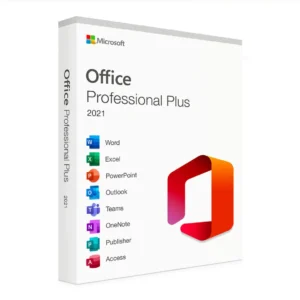
Microsoft Office 2019 Home and Business for Mac – Professional Productivity Suite
What You’re Getting:
Authentic Microsoft Office 2019 Home and Business license key for Mac, delivered digitally within 5-15 minutes of purchase. This is a genuine, full-version productivity suite designed for Mac users who need professional word processing, spreadsheets, presentations, email, and note-taking tools—without ongoing subscription fees.
Important Note: Microsoft Office 2019 reached end-of-support on October 13, 2020. While the software remains functional and won’t stop working, it no longer receives security updates or feature improvements. We recommend Microsoft 365 for continued updates and support. However, Office 2019 is an excellent choice for users seeking a permanent, one-time license with no recurring costs.
About This License:
✓ Genuine Microsoft License – Sourced from authorized resellers and volume distributors
✓ Full Version Software – Complete Home and Business feature set
✓ One-Time Purchase – Permanent license (no subscription needed)
✓ Permanent Activation – Tied to your Microsoft account, yours forever
✓ Digital Delivery – Download link and activation key sent via email (typically within 5-15 minutes)
✓ For One Mac – Installs on one Mac device (can be reinstalled if you replace your Mac)
✓ No Recurring Charges – No monthly or annual fees
Why Choose Office 2019 for Mac?
Office 2019 is perfect for professionals, students, and business users who want:
-
A permanent, one-time investment (no subscription)
-
Professional productivity tools that “just work”
-
Compatibility with Windows Office documents
-
Full feature set without limitations
-
No forced upgrades or changing features
Best For:
-
Mac users who prefer a one-time purchase over subscriptions
-
Small businesses and freelancers
-
Students and educators
-
Home office professionals
-
Users with stable workflow needs (don’t need latest features)
What’s Included in Office 2019 Home and Business:
Microsoft Word
-
Professional document creation and editing
-
Advanced formatting and styling tools
-
Collaboration features (track changes, comments)
-
Mail merge for personalized communications
-
Compatibility with Windows Word documents
Microsoft Excel
-
Powerful spreadsheet creation and analysis
-
Advanced formulas and functions
-
Data visualization with charts and graphs
-
PivotTables for data analysis
-
Macros and VBA scripting
Microsoft PowerPoint
-
Professional presentation creation
-
Dynamic slide designs and animations
-
Presenter notes and speaker view
-
Video and multimedia integration
-
Presentation delivery tools
Microsoft Outlook
-
Email management with full inbox control
-
Calendar and scheduling features
-
Contact management
-
Task and note organization
-
Integration with Exchange and other email services
Microsoft OneNote
-
Digital note-taking and organization
-
Notebook structure with sections and pages
-
Image and audio note capture
-
Search and organization tools
-
Sharing and collaboration features
Microsoft Teams (Included)
-
Chat and messaging with colleagues
-
Audio and video calling
-
File sharing and collaboration
-
Team workspace organization
Technical Specifications & System Requirements:
Mac Compatibility:
-
macOS 10.10 (Yosemite) or later (compatible through Big Sur, Monterey, Ventura, Sonoma, and Sequoia)
-
Newer versions support improved features and compatibility
-
Works seamlessly with latest Mac hardware (Intel and Apple Silicon Macs supported)
Hardware Requirements:
-
Processor: Intel processor or Apple Silicon (M1, M2, M3 compatible)
-
RAM: 4 GB minimum (8 GB recommended)
-
Storage: 10 GB free space minimum for installation
-
Display: 1280 x 800 resolution minimum
-
Internet Connection: Required for initial activation and account setup
Software Requirements:
-
Valid Apple ID (recommended for Microsoft account linking)
-
Internet connection for activation
-
macOS 10.10 or later
Key Differences: Office 2019 vs. Microsoft 365:
| Feature | Office 2019 | Microsoft 365 |
|---|---|---|
| Cost | One-time payment | Monthly/annual subscription |
| Updates | No new updates (ended Oct 2020) | Continuous updates & new features |
| Support | No official support | Full technical support included |
| Cloud Storage | Not included | 1 TB OneDrive included |
| Installation | One Mac | Up to 5 devices |
| Feature Set | Fixed (won’t change) | Growing (new features added) |
| Security | No new patches | Regular security updates |
| Collaboration | Basic | Advanced real-time collaboration |
How Activation Works:
-
Place Your Order – Purchase the Office 2019 Home and Business license
-
Receive Your License Key – License key delivered to your email within 5-15 minutes
-
Download Office – Download Office 2019 for Mac (link provided)
-
Install on Your Mac – Run installer and complete setup
-
Activate Your License – Enter your license key during setup
-
Link to Microsoft Account – Link to your Microsoft account at setup.office.com for easy access and future reinstalls
-
Start Using Office – All applications ready to use immediately
Typical activation time: 10-15 minutes (including download)
License Terms & Important Information:
What You Get:
-
One Office 2019 Home and Business license key
-
Permanent activation on one Mac
-
Access to all six applications (Word, Excel, PowerPoint, Outlook, OneNote, Teams)
-
Ability to reinstall on the same Mac if needed
-
Microsoft account linkage for license management
-
All existing features available (no feature limitations)
License Limitations:
-
This license is for one Mac only
-
The license cannot be transferred to another Mac permanently (you can temporarily move it, but it’s designed for one device)
-
The license is non-transferable to another person once activated
-
No multi-device licenses (for 5 devices, you’d need Microsoft 365)
-
Volume licensing available for businesses (contact support for bulk pricing)
Important Notes:
-
End-of-Support: October 13, 2020 – No new security updates are being released
-
Continued Functionality: The software remains fully functional and will continue to work on compatible Macs
-
Future Mac Compatibility: May have limitations on future macOS versions (Apple is transitioning to Apple Silicon)
-
Upgrade Path: Microsoft 365 provides continuous updates and new features if you want to upgrade later
Refund Policy:
-
Refunds accepted within 24 hours of purchase if license key has not been activated
-
No refunds after license activation (keys cannot be reused)
-
If your key fails to activate, we’ll provide a replacement key at no cost within 48 hours
-
For other issues, contact our 24/7 support team
Support & Assistance:
Our team is available 24/7 to help with:
-
Key delivery and activation issues
-
Installation guidance and troubleshooting
-
Mac compatibility questions
-
License key replacement (if needed)
-
General Office 2019 setup support
-
Migration guidance to Microsoft 365 (if interested)
Email: contact@coyotekeys.com
Support Response Time: Typically within 2 hours
Support Availability: 24 hours, 7 days a week
Frequently Asked Questions About Office 2019 for Mac:
Q: How long does activation take?
A: You’ll receive your license key within 5-15 minutes of purchase. Full installation and activation on your Mac typically takes 10-15 minutes.
Q: Can I use this license on multiple Macs?
A: No. This is a single-Mac license. If you need to use Office on multiple Macs, you’ll need to purchase additional licenses or consider Microsoft 365 (which supports up to 5 devices).
Q: What happens after October 2020 (end-of-support date)?
A: The software continues to work perfectly on your Mac. However, Microsoft no longer releases security updates or bug fixes. If you want the latest security patches and new features, you can upgrade to Microsoft 365.
Q: Will this work on the latest Mac (Apple Silicon)?
A: Yes, Office 2019 works on Apple Silicon Macs (M1, M2, M3). However, some features may have compatibility issues with future macOS versions. For guaranteed compatibility with future Mac OS updates, Microsoft 365 is recommended.
Q: What if I can’t activate my license key?
A: Our support team will troubleshoot with you free of charge. If the key is defective, we’ll provide a replacement immediately. Contact support@coyotekeys.com.
Q: Is this a legitimate Microsoft license?
A: Yes. This is a genuine Office 2019 Home and Business license for Mac sourced from authorized resellers. It provides the same functionality as a license purchased directly from Microsoft or the Mac App Store.
Q: Can I return my key if I change my mind?
A: Yes, if you haven’t activated it yet. We offer refunds within 24 hours of purchase for unopened/unactivated keys. Once activated, refunds cannot be issued as keys cannot be reused.
Q: What’s the difference between Office 2019 and Microsoft 365?
A: Office 2019 is a one-time purchase with no updates. Microsoft 365 is a subscription with continuous updates, 1 TB cloud storage, and support for up to 5 devices. Choose Office 2019 if you want a permanent investment; choose 365 if you want the latest features and updates.
Q: Do I need Microsoft 365 to use Office 2019?
A: No. Office 2019 is completely independent and doesn’t require any subscription or Microsoft 365 membership. It’s a standalone product.
Q: Can I upgrade to Microsoft 365 later?
A: Yes. You can purchase Microsoft 365 at any time. Your Office 2019 license remains valid and can be used alongside 365 on different devices.
Q: Is setup complicated?
A: No. Setup is straightforward. We provide step-by-step instructions and support if needed.
Q: Will the key work if I reinstall macOS?
A: Yes. If you link your license to your Microsoft account during setup, you can reinstall Office 2019 on the same Mac anytime.
Why Buy Office 2019 for Mac From Coyote Keys:
-
Genuine Licenses – All keys sourced from authorized distributors
-
Competitive Pricing – Volume purchasing allows us to offer better prices than retail
-
Fast Delivery – Digital keys arrive within 5-15 minutes
-
Expert Support – 24/7 support team to assist with any issues
-
Reliability – 46,000+ satisfied customers trust us
-
Money-Back Guarantee – Satisfaction guaranteed or your money back (within 24 hours, pre-activation)
-
One-Time Investment – No monthly fees or surprises
-
Immediate Access – Digital download available immediately
Reviews
There are no reviews yet.